


Supported MP3 File Formats
The radio will recognize only files with the *.MP3 extension as MP3 files. Non-MP3 files named with the *.MP3 extension may cause playback problems. The radio is designed to recognize the file as an invalid MP3 and will not play the file.
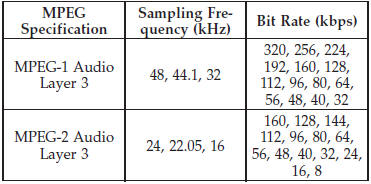
When using the MP3 encoder to compress audio data to an MP3 file, the bit rate and sampling frequencies in the following table are supported. In addition, variable bit rates (VBR) are also supported. The majority of MP3 files use a 44.1 kHz sampling rate and a 192, 160, 128, 96 or VBR bit rates.
ID3 Tag information for artist, song title, and album title are supported for version 1 ID3 tags. ID3 version 2 is not supported by the radios.
Playlist files are not supported. MP3 Pro files are not supported.
See also:
Engine Coolant Checks
Check the engine coolant (antifreeze) protection every 12 months (before the
onset of freezing weather, where applicable). If the engine coolant (antifreeze)
is dirty or rusty in appearance, the s ...
Ethanol Fuel (E-85)
E-85 is a mixture of approximately 85% fuel ethanol and
15% unleaded gasoline.
WARNING!
Ethanol vapors are extremely flammable and could
cause serious personal injury. Never have any smoking
...
Maintaining Your Air Bag System
WARNING!
• Modifications to any part of the air bag system could cause it to fail when you
need it. You could be injured if the air bag system is not there to protect you.
Do not modify the com ...