


Steering Wheel Audio Controls
The remote sound system controls are located on the rear surface of the steering wheel. Reach behind the wheel to access the switches.
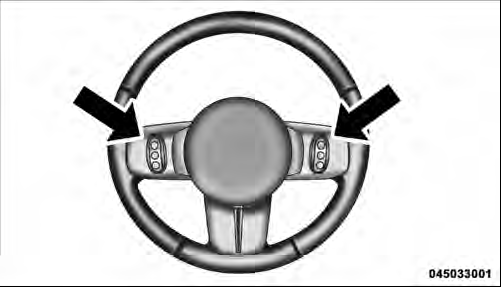
Remote Sound System Controls (Back View Of Steering Wheel)
The right-hand control is a rocker-type switch with a pushbutton in the center and controls the volume and mode of the sound system. Pressing the top of the rocker switch will increase the volume, and pressing the bottom of the rocker switch will decrease the volume.
Pressing the center button will make the radio switch between the various modes available (AM/FM/SAT/ CD/HDD/AUX/VES, etc.).
The left-hand control is a rocker-type switch with a pushbutton in the center. The function of the left-hand control is different depending on which mode you are in.
The following describes the left-hand control operation in each mode.
See also:
Towing Requirements – Trailer Brakes
− Do not interconnect the hydraulic brake system or
vacuum system of your vehicle with that of the trailer.
This could cause inadequate braking and possible
personal injury.
− An ele ...
Preparations For Jacking
1. Park on a firm, level surface. Avoid ice or slippery areas.
WARNING!
Do not attempt to change a tire on the side of the vehicle close to moving traffic,
pull far enough off the road to avoid be ...
Operating Instructions — Voice Command System (If Equipped)
For the radio, Refer to “Voice Command” in the
Uconnect™ User Manual located on the DVD for further
details. ...