


Air Conditioning Control
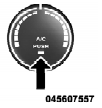
Press this button to engage the Air Conditioning. A light will illuminate when the Air Conditioning system is engaged. Rotating the dial left into the blue area of the scale indicates cooler temperatures, while rotating right into the red area indicates warmer temperatures.
NOTE: The air conditioning compressor will not engage until the engine has been running for about 10 seconds.
• MAX A/C
For maximum cooling use the A/C and recirculation buttons at the same time.
• ECONOMY MODE
If economy mode is desired, press the A/C button to turn OFF the indicator light and the A/C compressor. Then, move the temperature control to the desired temperature.
See also:
Shift Lever Override
If a malfunction occurs and the shift lever cannot be moved out of the PARK position,
you can use the following procedure to temporarily move the shift lever:
1. Firmly apply the parking brake.
2. ...
Recorded Discs
The VES™ DVD player will play CD-R and CD-RWdiscs
recorded in CD-Audio or Video-CD format, or as a
CD-ROM containing MP3 or WMA files. The player will
also play DVD-Video content recorded to a ...
Playback of MP3 Files
When a medium containing MP3 data is loaded, the
radio checks all files on the medium. If the medium
contains a lot of folders or files, the radio will take more
time to start playing the MP3 fi ...