


Hill Descent Control (HDC) – If Equipped
HDC is only intended for low speed off-road driving.
HDC maintains vehicle speed while descending hills in off-road driving conditions by applying the brakes when necessary.
When enabled, HDC senses the terrain and activates when the vehicle is descending a hill. HDC speed may be adjusted by the driver to suit the driving conditions. The speed corresponds to the transmission gear selected.
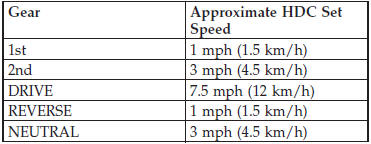
However, the driver can override HDC operation by applying the brake to slow the vehicle down below the HDC control speed. If more speed is desired during HDC control, the accelerator pedal will increase vehicle speed in the usual manner. When either the brake or the accelerator is released, HDC will control the vehicle at the original set speed.
NOTE: HDC is available on vehicles equipped with the MP1522 transfer case.
• The transfer case must be in 4WD LOW range to enable HDC.
• HDC is enabled only when the “Hill Descent Control Indicator Light” in the instrument cluster is on solid.
• HDC will NOT activate when the automatic transmission is in PARK.
• HDC will NOT activate on level ground.
• HDC will NOT activate at vehicle speeds above 30 mph (50 km/h).
The “Hill Descent” button is located in the lower switch bank below the climate control.
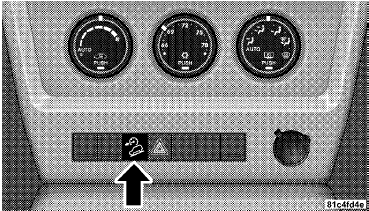
Hill Descent Button
Enabling HDC
1. Shift the transfer case into 4WD LOW range. Refer to “Four-Wheel Drive Operation” in “Starting and Operating” for further information.
2. Press the “Hill Descent” button. The “Hill Descent Control Indicator Light” in the instrument cluster will turn on solid.
NOTE: If the transfer case is not in 4WD LOW range, the “Hill Descent Control Indicator Light” will flash for five seconds and HDC will not be enabled.
Disabling HDC
1. Press the “Hill Descent” button or shift the transfer case out of 4WD LOW range. The “Hill Descent Control Indicator” light in the instrument cluster will turn off.
See also:
1999 Jeep Wrangler review
One would never expect to need a four-wheel drive vehicle unless snow is
flying. But, this case tested that theory.
I needed to travel to Philly to attend to some family business when the
heaven ...
Power Sunroof — If Equipped
The power sunroof switch is located between the sun
visors on the overhead console.
Power Sunroof Switch
WARNING!
• Never leave unattended children in a vehicle with
the key in the ignitio ...
Disposing Of Used Engine Oil And Oil Filters
Care should be taken in disposing of used engine oil and
oil filters from your vehicle. Used oil and oil filters,
indiscriminately discarded, can present a problem to the
environment. Contact yo ...