


Using The Touch-Screen Radio Controls
1. Press the MENU hard-key on the radio faceplate.
2. Touch the Rear VES soft-key to display the Rear VES Controls. If a channel list is displayed, press the HIDE LIST soft-key to display the Rear VES Controls screen.
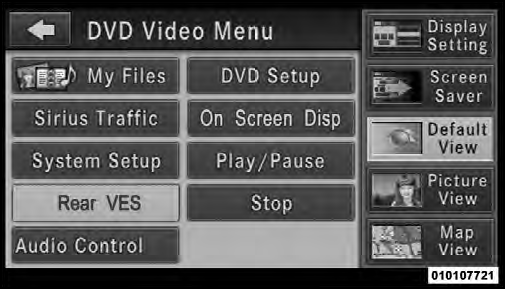
Rear VES Soft-key
3. Touch the 1 or 2 soft-key based on the channel you want to change and then the DISC soft-key in the MEDIA column. To exit touch the back arrow at the top left of the screen.
NOTE:
• To view a DVD on the radio press the RADIO/MEDIA
hard-key, on the radio faceplate, then touch the DISC
tab soft-key and then the VIEW VIDEO soft-key.
• Viewing a DVD on the Touch-Screen radio screen is not available in all states/provinces, and the vehicle must be stopped, and the shift lever must be in the PARK position for vehicles with automatic transmission.
In vehicles with manual transmission the parking brake must be engaged.
• Touching the screen on a Touch-Screen radio while a DVD is playing brings up basic remote control functions for DVD play such as scene selection, Play, Pause, FF, RW, and Stop. Pressing the X in the upper corner will turn off the remote control screen functions.
See also:
Rain Brake Support – If Equipped
Rain Brake Support may improve braking performance
in wet conditions. It will periodically apply a small
amount of brake pressure to remove any water buildup
on the front brake rotors. It only f ...
Engineering
The all-new 2008 Jeep Liberty offers a balance of off-road capability and
on-road refinement.
All-new independent front suspension, all-new five-link rear suspension, and
a power rack-and-pinion ...
Key-In-Ignition Reminder
If you open the driver’s door and the key is in the
ignition, a chime will sound to remind you to remove the
key.
NOTE: The Key-In-Ignition reminder only sounds
when the ignition key is place ...