


Headphones Operation
The headphones receive two separate channels of audio using an infrared transmitter from the video screen.
Front seat occupants receive some headphone audio coverage to allow them to adjust the headphone volume for the young rear seat occupants that may not be able to do so for themselves.
If no audio is heard after increasing the volume control, verify that the screen is turned on and in the down position and that the channel is not muted and the headphone channel selector switch is on the desired channel. If audio is still not heard, check that fully charged batteries are installed in the headphones.
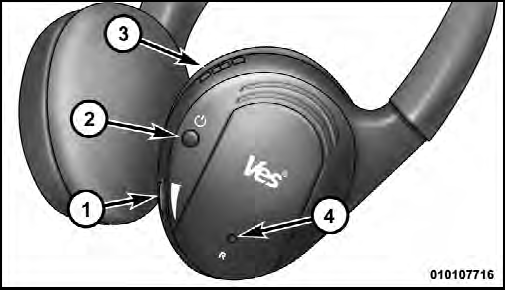
1. Volume Control
2. Power Button
3. Channel Selection Switch
4. Power Indicator
See also:
Towing Without The Ignition Key Fob
Special care must be taken when the vehicle is towed
with the ignition in the LOCK/OFF position. The only
approved method of towing without the ignition key is
with a flatbed truck. Proper towin ...
Oil Change Required
Your vehicle is equipped with an engine oil change
indicator system. The “Oil Change Required” message
will flash in the EVIC display for approximately 10 seconds
after a single chime has so ...
Checking Oil Level
To assure proper engine lubrication, the engine oil must
be maintained at the correct level. Check the oil level at
regular intervals, such as every fuel stop. The best time to
check the engine ...