


Display Settings
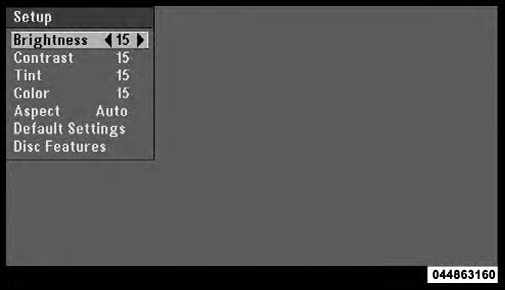
Video Screen Display Settings
When watching a video source (DVD Video with the disc in Play mode, Aux Video, SIRIUS Backseat TV™, etc.), pressing the remote control’s SETUP button activates the Display Settings menu. These settings control the appearance of the video on the screen. The factory default settings are already set for optimum viewing, so there is no need to change these settings under normal circumstances.
To change the settings, press the remote control’s navigation
buttons (  ,
,
 ) to select an item, then press the
remote control’s navigation buttons (
) to select an item, then press the
remote control’s navigation buttons ( ,
,
 ) to change the
value for the currently selected item. To reset all values
back to the original settings, select the Default Settings
menu option and press the remote control’s ENTER
button.
) to change the
value for the currently selected item. To reset all values
back to the original settings, select the Default Settings
menu option and press the remote control’s ENTER
button.
Disc Features control the remote DVD player’s (if equipped) settings of DVD being watched in the remote player.
See also:
List Or Browse Mode
During Play mode, pressing any of the buttons described below, will bring up
List mode. List mode enables scrolling through the list of menus and tracks on the
audio device.
• TUNE control knob ...
Three-Way Calling
To initiate three-way calling, press the
button while
a call is in progress, and make a second phone call, as
described under “Making a Second Call While Current
Call is in Progress”. Afte ...
Summer Operation
NOTE: In some cases during high temperature trailer
tow operation the Air Conditioning system performance
may be reduced. This is to help protect the engine from
overheating during the high load ...