


Axle Lock (Tru–Lok ) — Rubicon Models
The AXLE LOCK switch is located on the instrument panel (to the left of the steering column).
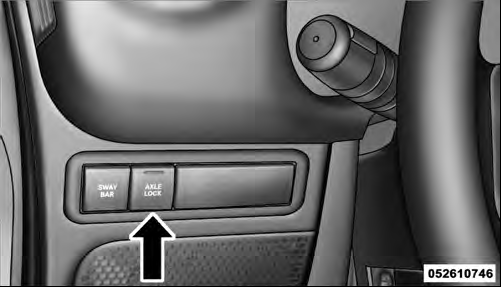
Axle Lock Switch
This feature will only activate when the following conditions are met:
• Key in ignition, vehicle in 4L (Low) range.
• Vehicle speed should be 10 mph (16 km/h) or less.
To activate the system, press the bottom of the AXLE LOCK switch once to lock the rear axle only (the “Rear Axle Lock Indicator Light” will illuminate), press the bottom of the switch again to lock the front axle (the “Front Axle Lock Indicator Light” will illuminate). When the rear axle is locked, pressing the switch again will lock or unlock the front axle.
NOTE: The indicator lights will flash until the axles are fully locked or unlocked.
To unlock the axles, press the top of the AXLE LOCK switch.
Axle lock will disengage if the vehicle is taken out of 4L (Low) range, or the ignition switch is turned to the OFF position.
See also:
Language
When in this display you may select one of five languages
for all display nomenclature, including the trip
functions and the navigation system (if equipped). Press
the SELECT button while in thi ...
Compact Spare Tire – If Equipped
The compact spare is for temporary emergency use only.
You can identify if your vehicle is equipped with a
compact spare by looking at the spare tire description on
the Tire and Loading Informati ...
General Information
This device complies with part 15 of FCC rules and with RS-210 of Industry Canada.
Operation is subject to the following conditions:
1. This device may not cause harmful interference.
2. This devi ...