


Dual-Zone Automatic Temperature Control (ATC) — If Equipped
• The Automatic Temperature Control (ATC) allows both driver and front passenger seat occupants to select individual comfort settings.
• When occupants in the vehicle select the AUTO mode operation, a comfort temperature can be set by using the temperature up and down buttons, and the auto blower operation will be set automatically.
• The system provides set-and-forget operation for optimum comfort and convenience.
• The system can be controlled manually, if desired.
The ATC system automatically maintains the interior comfort level desired by the driver and passenger.
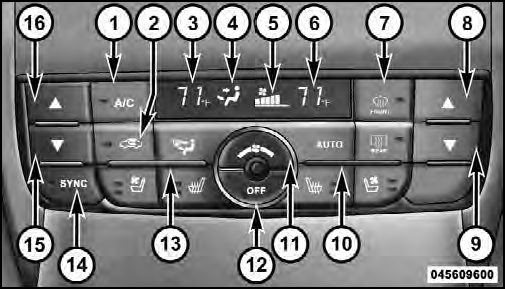
Automatic Temperature Control (ATC) Panel
1. A/C Button
Press and release to change the current Air Conditioning (A/C) setting, the indicator illuminates when A/C is ON.
Performing this function will cause the ATC to switch into manual mode.
2. Recirculation Control Button
Press and release to change the current setting, the indicator illuminates when ON.
3. Left Front Seat Occupant Temperature Display
This display shows the temperature setting for the left front seat occupant.
4. Mode Display
This display shows the current Mode selection (Panel, Bi-Level, Floor, Mix).
5. Blower Control Display
This display shows the current Blower speed selection.
6. Right Front Seat Occupant Temperature Display
This display shows the temperature setting for the right front seat occupant.
7. Front Defrost Button
Press and release to change the current setting, the indicator illuminates when ON. Performing this function will cause the ATC to switch into manual mode. The blower will engage immediately if the Defrost mode is selected.
8. Passenger Temperature Control Up Button
Provides the passenger with independent temperature control. Push the button for warmer temperature settings.
9. Passenger Temperature Control Down Button
Provides the passenger with independent temperature control. Push the button for cooler temperature settings.
10. Auto Temperature Control Button
Controls airflow temperature, distribution, volume, and the amount of air recirculation automatically. Press and release to select. Refer to “Automatic Operation” for more information. Performing this function will cause the ATC to switch between manual mode and automatic modes.
11. Blower Control
There are seven blower speeds, the blower speed increases as you move the control to the right from the lowest blower setting. Performing this function will cause the ATC to switch into manual mode.
12. Climate Control OFF Button
Press and release this button to turn the Climate Control OFF
13. Mode Control Button
Press and release to select between Modes (Panel, Bi- Level, Floor, Mix). Performing this function will cause the ATC to switch into manual mode.
14. SYNC Button
Press and release to control the temperature setting for both zones from the driver temperature control.
15. Driver Temperature Control Down Button
Provides the driver with independent temperature control.
Push the button for cooler temperature settings.
16. Driver Temperature Control Up Button
Provides the driver with independent temperature control.
Push the button for warmer temperature settings.
See also:
Towing Requirements – Trailer Lights And Wiring
Whenever you pull a trailer, regardless of the trailer size,
stoplights and turn signals on the trailer are required for
motoring safety.
The Trailer Tow Package may include a four and sevenpin
...
Tires
Examine tires for excessive tread wear and uneven wear
patterns. Check for stones, nails, glass, or other objects
lodged in the tread or sidewall. Inspect the tread for cuts
and cracks. Inspect ...
On-Road Driving Tips
Utility vehicles have higher ground clearance and a narrower track to make them
capable of performing in a wide variety of off-road applications. Specific design
characteristics give them a higher ...