


High Range (Four-Wheel Drive Models) Or Two-Wheel Drive Models
On
This is the normal operating mode for ESC in 4WD HIGH range and in two-wheel drive vehicles. Whenever the vehicle is started or the transfer case (if equipped) is shifted from 4WD LOW range or NEUTRAL back to 4WD HIGH range, the ESC system will be in this “On” mode. This mode should be used for most driving situations. ESC should only be turned to “Partial Off” mode for specific reasons as noted below.
Partial Off
This mode is entered by momentarily pressing the “ESC OFF” switch. When in “Partial Off” mode, the TCS portion of ESC, except for the BLD feature described in the TCS section, has been disabled and the “ESC Off Indicator Light” will be illuminated. All other stability features of ESC function normally. This mode is intended to be used if the vehicle is in deep snow, sand, or gravel conditions and more wheel spin than ESC would normally allow is required to gain traction. To turn ESC on again, momentarily press the “ESC OFF” switch. This will restore the normal “ESC On” mode of operation.
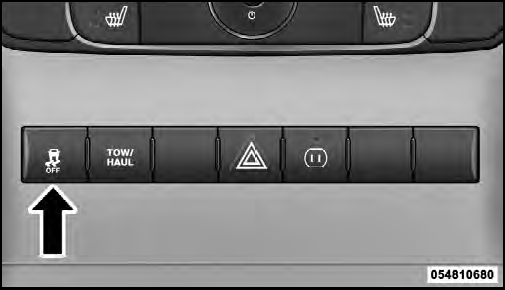
ESC OFF Switch
NOTE: To improve the vehicle’s traction when driving with snow chains, or starting off in deep snow, sand, or gravel, it may be desirable to switch to the “Partial Off” mode by pressing the “ESC OFF” switch. Once the situation requiring ESC to be switched to the “Partial Off” mode is overcome, turn ESC back on by momentarily pressing the “ESC OFF” switch. This may be done while the vehicle is in motion.
See also:
Play A DVD Using The Touch-Screen Radio
1. Press the OPEN/CLOSE or LOAD hard-key on the
radio faceplate (Touch-Screen).
2. Insert the DVD with the label facing up. The radio
automatically selects the appropriate mode after the disc
i ...
Flash Lamps With Lock
When this feature is selected, the front and rear turn
signals will flash when the doors are locked or unlocked
with the RKE transmitter. This feature may be selected
with or without the sound h ...
Turning Confirmation Prompts On/Off
Turning confirmation prompts off will stop the system from confirming your choices
(e.g., the Uconnect™ Phone will not repeat a phone number before you dial it).
• Press the button to begin.
â ...