


Hill Descent Control (HDC) — Four-Wheel Drive Models With MP3023 Two-Speed Transfer Case Only
HDC maintains vehicle speed while descending hills during off-road driving situations and is available in 4WD LOW range only. To enable HDC, press the HDC switch or put the Selec-Terrain™ system in “ROCK” mode (“ROCK” mode is only available in 4WD LOW range).
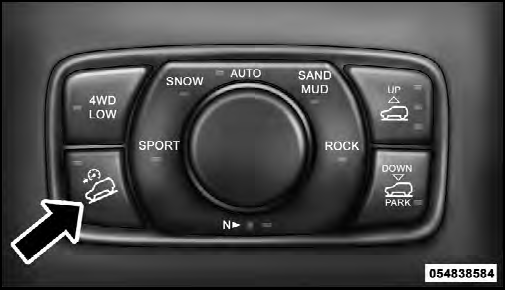
Hill Descent Switch
When HDC is enabled, the HDC icon will be illuminated in the instrument cluster. HDC will automatically apply the brakes to control downhill speed to the selected level when necessary on grades greater than approximately 8%. It will usually not activate on level ground.
The HDC speed may be adjusted by the driver to suit the driving conditions. The speed corresponds to the transmission gear selected.
HDC operation can be overridden with brake application to slow the vehicle down below the HDC control speed.
Conversely, if more speed is desired during HDC control, the accelerator pedal will increase vehicle speed in the usual manner. When either the brake or the accelerator is released, HDC will control the vehicle back to the original set speed.
HDC Operation In 4WD Low Range
To enable HDC, press the HDC switch or put the Selec-Terrain™ system in the “ROCK” mode. The HDC icon will be illuminated in the instrument cluster and HDC will function. If the vehicle speed goes above 20 mph (32 km/h), the HDC icon will flash and HDC will not function. To disable HDC, press the HDC switch.
4WD Low Range Set Speeds
• 1st = 1 mph (1.6 km/h)
• 2nd = 2.5 mph (4 km/h)
• 3rd = 4 mph (6 km/h)
• 4th = 5.5 mph (9 km/h)
• 5th, 6th or D (Drive) = 7.5 mph (12 km/h)
• REVERSE = 1 mph (1.6 km/h)
• NEUTRAL = 2.5 mph (4 km/h)
• PARK = HDC will not function
HDC is intended for low speed off-road driving only.
At vehicle speeds above 20 mph (32 km/h), HDC will no longer function. When the vehicle speed drops below 20 mph (32 km/h), HDC function will automatically resume and the vehicle speed will return to the chosen set speed.
WARNING!
HDC is only intended to assist the driver in controlling
vehicle speed when descending hills. The driver
must remain attentive to the driving conditions and
is responsible for maintaining a safe vehicle speed.
See also:
Engine Compartment – 5.7L
1 — Totally Integrated Power Module (Fuses)
2 — Automatic Transmission Dipstick
3 — Engine Oil Fill
4 — Brake Fluid Reservoir
5 — Air Cleaner Filter
6 — Washer Fluid Reservoir ...
Driving Impressions
Chrysler's 2.4-liter four-cylinder provides just enough vim to keep the
scenery passing, but lead-footed drivers will probably be disappointed. The
five-speed manual transmission shifts smoothly. ...
Child-Protection Door Lock System — Rear Doors
To provide a safer environment for small children riding in the rear seats, the
rear doors are equipped with Child-Protection Door Lock system. ...