


Supported MP3 File Formats
The radio will recognize only files with the *.MP3 extension as MP3 files. Non-MP3 files named with the *.MP3 extension may cause playback problems. The radio is designed to recognize the file as an invalid MP3 and will not play the file.
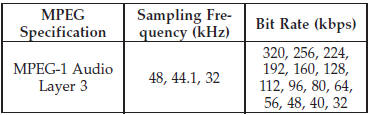
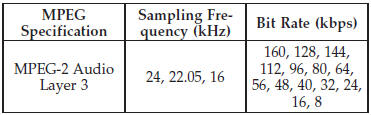
When using the MP3 encoder to compress audio data to an MP3 file, the bit rate and sampling frequencies in the following table are supported. In addition, variable bit rates (VBR) are also supported. The majority of MP3 files use a 44.1 kHz sampling rate and a 192, 160, 128, 96 or VBR bit rate.
ID3 Tag information for artist, song title, and album title are supported for version 1 ID3 tags. ID3 version 2 is not supported by the radios.
Playlist files are not supported. MP3 Pro files are not supported.
See also:
Transporting Pets
Air Bags deploying in the front seat could harm your pet.
An unrestrained pet will be thrown about and possibly
injured, or injure a passenger during panic braking or in
an accident.
Pets should ...
Uconnect™ Phone — If Equipped
Uconnect™ Phone is a voice-activated, hands-free, invehicle
communications system. Uconnect™ Phone allows
you to dial a phone number with your mobile
phone using simple voice commands (e.g., ...
Spare Tire Matching Original Equipped Tire And Wheel – If Equipped
Your vehicle may be equivalent with a spare tire and wheel in look and function
as the original equipment tire and wheel found on the front or rear axle of your
vehicle.
This spare tire may be us ...