


Front Head Restraints
To raise the head restraint, pull upward on the head restraint. To lower the head restraint, press the adjustment button, located on the base of the head restraint, and push downward on the head restraint.
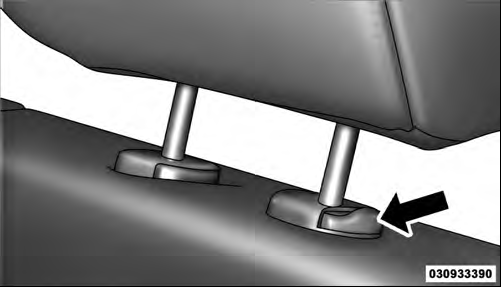
Adjustment Button
See also:
Cancel Command
At any prompt, after the beep, you can say “Cancel” and you will be returned
to the main menu. However, in a few instances the system will take you back to the
previous menu. ...
Listening To Audio With The Screen Closed
To listen to only audio portion of the channel with the
screen closed:
• Set the audio to the desired source and channel.
• Close the video screen.
• To change the current audio mode, press ...
Dual-Zone Automatic Temperature Control (ATC) — If Equipped
• The Automatic Temperature Control (ATC) allows
both driver and front passenger seat occupants to
select individual comfort settings.
• When occupants in the vehicle select the AUTO mode
o ...