


Instrument Panel Features
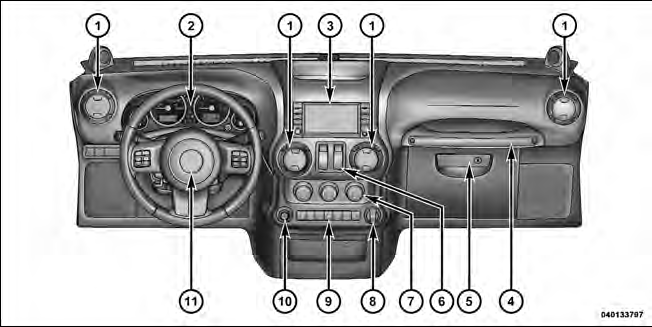 1 — Air Outlet
2 — Instrument Cluster
3 — Radio
4 — Assist Handle
5 — Glove Compartment
6 — Power Window Switches
7 — Climate Controls
8 — Power Outlet
9 — Lower Switch Bank
10 — Power Mirror Switch — If Equipped
11 — Horn
See also:
Compass/Temperature Display
NOTE: If the vehicle is equipped with a Chrysler Uconnect™ gps (Navigation
Radio), the NAV system will provide the compass direction, and the variance and
calibration menus will be unavailable. ...
Gross Vehicle Weight Rating (GVWR)
The GVWR is the total permissible weight of your vehicle including driver, passengers,
vehicle, options, trailer tongue weight, and cargo. The label also specifies maximum
capacities of front and ...
Economy
Improper inflation pressures can cause uneven wear
patterns to develop across the tire tread. These abnormal
wear patterns will reduce tread life resulting in a need for
earlier tire replacement ...