


Trip Conditions
Trip Odometer (ODO) / ECO (Fuel Saver Indicator) — If Equipped
This display shows the distance traveled since the last reset. Press and release the right button (on the instrument cluster) to switch from odometer to Trip A or Trip B or to ECO. Press and hold the right button while the odometer/trip odometer is displayed to reset.
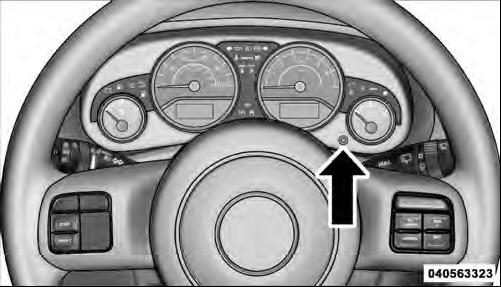
Trip Display Button
Trip A
Shows the total distance traveled for trip A since the last reset.
Trip B
Shows the total distance traveled for trip B since the last reset.
ECO (Fuel Saver Indicator) — If Equipped
The ECO indicator will illuminate when you are driving in a fuel efficient manner and can be used to modify driving habits in order to increase fuel economy.
See also:
Recreational Towing — Four-Wheel Drive Models
The transfer case must be shifted into NEUTRAL (N) and
the transmission must be placed in PARK for recreational
towing. The NEUTRAL (N) selection button is adjacent to
the transfer case selector ...
Heated Seats — If Equipped
On some models, the front driver and passenger seats may be equipped with heaters
in both the seat cushions and seatbacks.
There are two heated seat switches that allow the driver and passenger to ...
Satellite Antenna
To ensure optimum reception, do not place items on the
roof around the rooftop antenna location. Metal objects
placed within the line of sight of the antenna will cause
decreased performance. La ...