


Supported MP3 File Formats
The radio will recognize only files with the *.MP3 extension as MP3 files. Non-MP3 files named with the *.MP3 extension may cause playback problems. The radio is designed to recognize the file as an invalid MP3 and will not play the file.
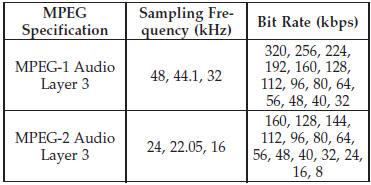
When using the MP3 encoder to compress audio data to an MP3 file, the bit rate and sampling frequencies in the following table are supported. In addition, variable bit rates (VBR) are also supported. The majority of MP3 files use a 44.1 kHz sampling rate and a 192, 160, 128, 96 or VBR bit rates.
ID3 Tag information for artist, song title, and album title are supported for version 1 ID3 tags. ID3 version 2 is not supported by the radios.
Playlist files are not supported. MP3 Pro files are not supported.
See also:
EJECT Button - Ejecting a CD
Press the EJECT button to eject the CD.
If you have ejected a disc and have not removed it within 10 seconds, it will
be reloaded. If the CD is not removed, the radio will reinsert the CD but wil ...
Cleaning Plastic Instrument Cluster Lenses
The lenses in front of the instruments in this vehicle are molded in clear plastic.
When cleaning the lenses, care must be taken to avoid scratching the plastic.
1. Clean with a wet, soft rag. A mi ...
Fluid Level Check
The fluid level should be to the bottom edge of the fill hole (A) when the vehicle
is in a level position.
...