


Connecting The iPod Or External USB Device
Use the connection cable to connect an iPod or external USB device to the vehicle’s USB/AUX connector port which is located in the center console.
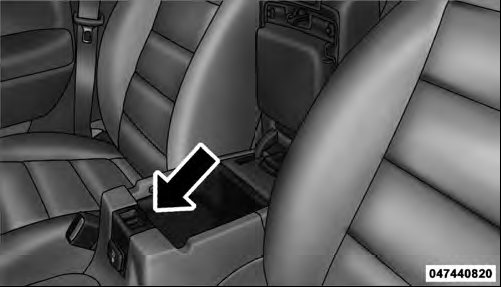
Center Console USB/AUX Connector Port
Once the audio device is connected and synchronized to the vehicle’s iPod /USB/MP3 control system (iPod or external USB device may take a few minutes to connect), the audio device starts charging and is ready for use by pressing radio switches, as described below.
NOTE: If the audio device battery is completely discharged, it may not communicate with the iPod /USB/ MP3 control system until a minimum charge is attained.
Leaving the audio device connected to the iPod /USB/ MP3 control system may charge it to the required level.
See also:
Starting Procedures
Before starting your vehicle, adjust your seat, adjust both inside and outside
mirrors, and fasten your seat belts.
WARNING!
• When leaving the vehicle, always remove the key fob from the igniti ...
Rearming Of The System
If something triggers the Vehicle Security Alarm, and no
action is taken to disarm it, the Vehicle Security Alarm
will turn off the horn after three minutes, turn off all of
the visual signals a ...
AM/FM Button
Press the button to select either AM or FM mode. ...