


Tilt/Telescoping Steering Column
This feature allows you to tilt the steering column upward or downward. It also allows you to lengthen or shorten the steering column. The tilt/telescoping lever is located below the steering wheel at the end of the steering column.
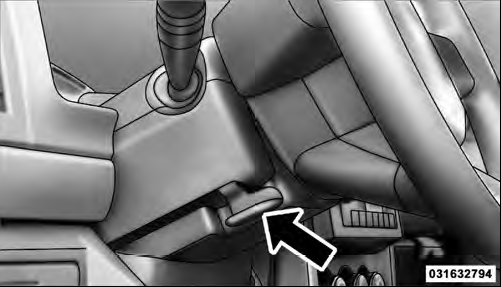
Tilt/Telescoping Lever
To unlock the steering column, pull the lever downward.
To tilt the steering column, move the steering wheel upward or downward as desired. To lengthen or shorten the steering column, pull the steering wheel outward or push it inward as desired. To lock the steering column in position, push the lever upward until fully engaged.
WARNING!
Do not adjust the steering column while driving.
Adjusting the steering column while driving or driving with the steering column unlocked, could cause the driver to lose control of the vehicle. Be sure the steering column is locked before driving your vehicle.
Failure to follow this warning may result in serious injury or death.
See also:
Instrument Panel Dimmer
Rotate the center portion of the lever to the extreme bottom position to fully
dim the instrument panel lights and prevent the interior lights from illuminating
when a door is opened.
Rotate the ...
Electronic Brake Control System
Your vehicle is equipped with an advanced electronic brake control system that
includes Anti-Lock Brake System (ABS), Traction Control System (TCS), Brake Assist
System (BAS), Hill Start Assist (H ...
Interior Care
Instrument Panel Cover
The instrument panel cover has a low glare surface,
which minimizes reflections in the windshield. Do not
use protectants or other products, which may cause
undesirable r ...