


Parksense Warning Display
The ParkSense Warning screen will only be displayed if Sound and Display is selected from the Customer- Programmable Features section of the Electronic Vehicle Information Center (EVIC). Refer to “Electronic Vehicle Information Center (EVIC)/Personal Settings (Customer- Programmable Features)” in “Understanding Your Instrument Panel” for further information.
The ParkSense Warning Display is located in the Instrument cluster’s EVIC display. It provides both visual and audible warnings to indicate the distance between the rear fascia/bumper and the detected obstacle.
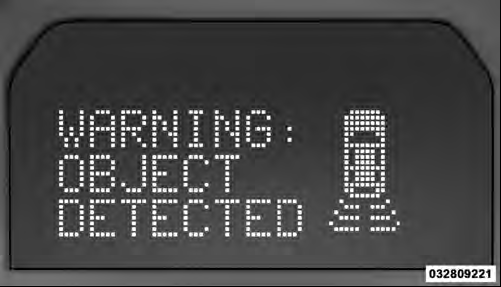
ParkSense Warning Display
See also:
Opening Sunroof — Manual Mode
To open the sunroof, press and hold the switch rearward
to full open. Any release of the switch will stop the
movement and the sunroof will remain in a partially
opened condition until the switc ...
Reverse Shifting
To shift into REVERSE, bring the vehicle to a complete stop. Press the clutch
and pause briefly to allow the gear train to stop rotating. Beginning from the NEUTRAL
position, move the shift lever ...
Engineering
Jeep Wrangler delivers unmatched off-road capability with legendary
four-wheel drive and is produced with more than seven decades of 4x4 engineering
experience behind it. Wrangler continues to off ...