


Instrument Panel Features
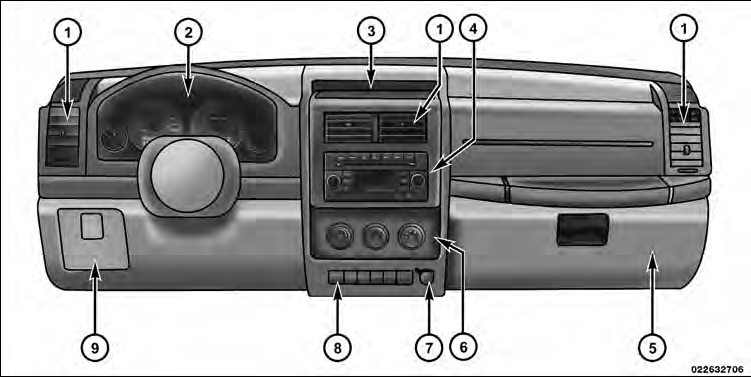
1 — Air Outlet
2 — Instrument Cluster
3 — Storage Tray
4 — Radio
5 — Glove Compartment
6 — Climate Control
7 — Power Outlet
8 — Lower Switch Bank
9 — Storage Bin (if equipped)
See also:
Engine Coolant Checks
Check the engine coolant (antifreeze) protection every
12 months (before the onset of freezing weather, where
applicable). If the engine coolant (antifreeze) is dirty or
rusty in appearance, the ...
Safety
The 2011 Grand Cherokee is a 2010 Top Safety Pick from the Insurance
Institute for Highway Safety. To earn the designation, it received Good overall
scores in IIHS' frontal-offset crash test, side ...
In the Cabin
The Patriot's interior quality isn't class-leading, but it's acceptable for a
car of this price — bearing in mind that the starting price is for a seriously
stripped-down Sport model. (Option pa ...