


Compass Variance
Compass Variance is the difference between Magnetic North and Geographic North. To compensate for the differences, the variance should be set for the zone where the vehicle is driven, per the zone map. Once properly set, the compass will automatically compensate for the differences and provide the most accurate compass heading.
NOTE: Magnetic materials should be kept away from the top of the right rear quarter window. This is where the compass sensor is located.
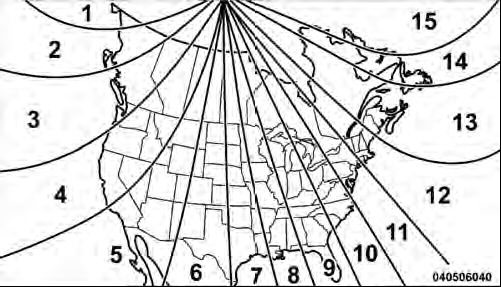
Compass Variance Map
To Change The Compass Variance:
1. Turn the ignition switch ON.
2. Press the MENU button until the Personal Settings (Customer-Programmable Features) menu displays in the EVIC.
3. Press the DOWN button until “Compass Variance” displays in the EVIC.
4. Press and release the SELECT button until the proper variance zone is selected according to the map.
NOTE: The Variance Values will wrap around from 15 back to 1. The Default Variance is Zone 8.
5. Press and release the COMPASS button to exit.
See also:
Side Window Demisters
A side window demister outlet is located at each end of the instrument panel.
These non-adjustable outlets direct air toward the side windows when the system
is in the Floor, Mix, or Defrost mode. ...
Sound Horn With Lock
When on is selected, a short horn sound will occur when
the RKE transmitter LOCK button is pressed. This feature
may be selected with or without the Flash Lamp with
Remote Key Lock feature. To m ...
Heated Seats — If Equipped
On some models, the front driver and passenger seats may be equipped with heaters
in both the seat cushions and seatbacks.
There are two heated seat switches that allow the driver and passenger to ...