


Air Conditioning Control
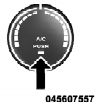
Press this button to engage the Air Conditioning. A light will illuminate when the Air Conditioning system is engaged. Rotating the dial left into the blue area of the scale indicates cooler temperatures, while rotating right into the red area indicates warmer temperatures.
NOTE: The air conditioning compressor will not engage until the engine has been running for about 10 seconds.
• MAX A/C
For maximum cooling use the A/C and recirculation buttons at the same time.
• ECONOMY MODE
If economy mode is desired, press the A/C button to turn OFF the indicator light and the A/C compressor. Then, move the temperature control to the desired temperature.
See also:
Illumin. Approach
When this feature is selected, the headlights will activate and remain on for
up to 90 seconds when the doors are unlocked with the RKE transmitter. To make your
selection, press and hold the SELE ...
Key Ignition Park Interlock
This vehicle is equipped with a Key Ignition Park Interlock
which requires the shift lever to be placed in PARK
before the ignition switch can be turned to the LOCK/
OFF position. The key fob ca ...
Sound Horn With Lock
This feature will cause the horn to chirp when the doors
are locked with the RKE transmitter. This feature can be
turned on or turned off. To change the current setting,
proceed as follows:
• ...