


Ambient Light Color Control — If Equipped
Ambient lights are located under the instrument panel and the driver’s and passenger’s front seats. The color of the ambient lights can be changed by pressing the button located above the shift lever. Press the button to toggle through the colors and back to the off position.
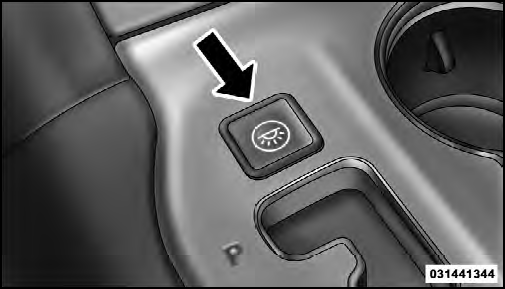
Ambient Light Color Control
See also:
Glass Surfaces
All glass surfaces should be cleaned on a regular basis
with MOPAR Glass Cleaner or any commercial
household-type glass cleaner. Never use an abrasive type
cleaner. Use caution when cleaning the ...
Customer Assistance For The Hearing Or Speech Impaired (TDD/TTY)
To assist customers who have hearing difficulties, the
manufacturer has installed special TDD (Telecommunication
Devices for the Deaf) equipment at its customer
center. Any hearing or speech imp ...
Driver Memory Seat — If Equipped
Once programmed, the memory buttons 1 and 2 on the
driver’s door panel can be used to recall the driver’s seat,
driver’s outside mirror, adjustable steering wheel position
(if equipped), a ...