


Information Mode Display
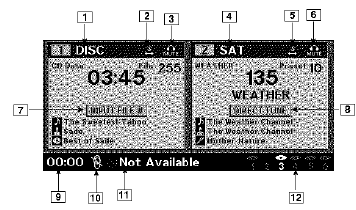
Information Mode Video Screen Display
1. Channel 1 Mode
2. Channel 1 Shared Status
3. Channel 1 Audio Only/Mute
4. Channel 2 Mode
5. Channel 2 Shared Status
6. Channel 2 Audio Only/Mute
7. Channel 1 ENTER Button Action
8. Channel 2 ENTER Button Action
9. Clock
10. Video Lock
11. Not Available / Error
12. Disc Changer Status
See also:
Liftgate Flipper Glass
The liftgate flipper glass is also unlocked when the
liftgate is unlocked. To open the flipper glass, push up on
the window switch located on the liftgate.
Liftgate Flipper Glass Release
NOTE: ...
Engineering
The all-new 2008 Jeep Liberty offers a balance of off-road capability and
on-road refinement.
All-new independent front suspension, all-new five-link rear suspension, and
a power rack-and-pinion ...
Snow
In heavy snow or for additional control and traction at slower speeds, shift
the transmission into a low gear and the transfer case into 4L (Low) if necessary.
Do not shift to a lower gear than ne ...