


Steering Wheel Audio Controls
The remote sound system controls are located on the rear surface of the steering wheel. Reach behind the wheel to access the switches.
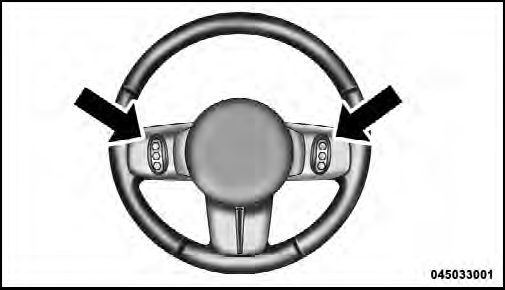
Remote Sound System Controls (Back View Of Steering Wheel)
The right-hand control is a rocker-type switch with a pushbutton in the center and controls the volume and mode of the sound system. Pressing the top of the rocker switch will increase the volume, and pressing the bottom of the rocker switch will decrease the volume.
Pressing the center button will make the radio switch between the various modes available (AM/FM/SAT/ CD/HDD/AUX/VES, etc.).
The left-hand control is a rocker-type switch with a pushbutton in the center. The function of the left-hand control is different depending on which mode you are in.
The following describes the left-hand control operation in each mode.
See also:
Hill Start Assist (HSA)
The HSA system is designed to assist the driver when starting a vehicle from
a stop on a hill. HSA will maintain the level of brake pressure the driver applied
for a short period of time after the ...
Tire Markings
1 — U.S. DOT Safety Standards Code
(TIN)
2 — Size Designation
3 — Service Description
4 — Maximum Load 5 — Maximum Pressure
6 — Treadwear, Traction and Temperature Grades
NOTE:
†...
Halogen Headlamps – If Equipped
1. Open the hood.
2. Turn the low or high beam bulb one–quarter turn
counterclockwise to remove from housing.
3. Disconnect the electrical connector and replace the
bulb.
CAUTION!
Do not to ...