


Front Head Restraints
To raise the head restraint, pull upward on the head restraint. To lower the head restraint, press the adjustment button, located on the base of the head restraint, and push downward on the head restraint.
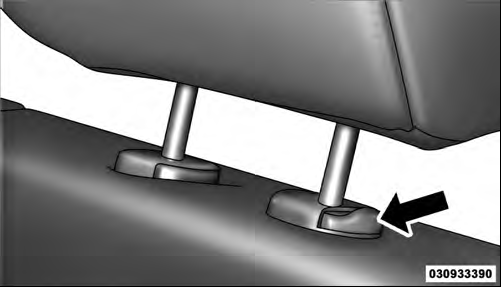
Adjustment Button
See also:
Remote Key Unlock, Driver Door/All Doors First
This feature lets you program the system to unlock either
the driver’s door or all doors and the liftgate on the first
press of the UNLOCK button on the RKE transmitter. To
change the current ...
SEEK Button
Press the right SEEK button for the next selection on the CD. Press the left
SEEK button to return to the beginning of the current selection, or return to the
beginning of the previous selection i ...
Wheel And Wheel Trim Care
• All wheels and wheel trim, especially aluminum and
chrome plated wheels, should be cleaned regularly
with a mild soap and water to prevent corrosion.
• To remove heavy soil and/or excessive ...