


Automatic Headlights — If Equipped
This system automatically turns the headlights on or off according to ambient light levels. To turn the system on, turn the end of the multifunction lever to the AUTO position (third detent). When the system is on, the Headlight Time Delay feature is also on. This means the headlights will stay on for up to 90 seconds after you turn the ignition switch to the LOCK position. To turn the Automatic System off, turn the end of the multifunction lever out of the AUTO position.
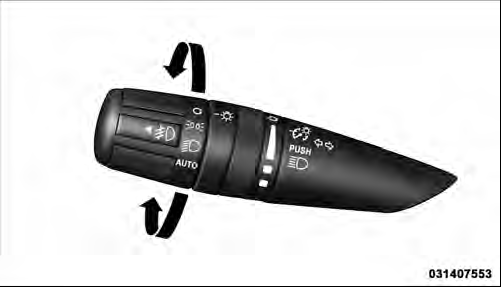
Headlight Switch
NOTE: The engine must be running before the headlights will turn on in the Automatic mode.
See also:
Road Tire Installation
1. Mount the road tire on the axle.
2. Install the remaining lug nuts with the cone shaped
end of the nut toward the wheel. Lightly tighten the lug
nuts.
WARNING!
To avoid the risk of forcing ...
Warnings And Cautions
This Owner’s Manual contains WARNINGS against operating procedures that could
result in a collision or bodily injury. It also contains CAUTIONS against procedures
that could result in damage to ...
How To Use This Manual
Consult the Table of Contents to determine which section
contains the information you desire.
Since the specification of your vehicle depends on the
items of equipment ordered, certain descriptio ...