


Supported MP3 File Formats
The radio will recognize only files with the *.MP3 extension as MP3 files. Non-MP3 files named with the *.MP3 extension may cause playback problems. The radio is designed to recognize the file as an invalid MP3 and will not play the file.
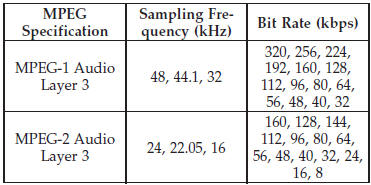
When using the MP3 encoder to compress audio data to an MP3 file, the bit rate and sampling frequencies in the following table are supported. In addition, variable bit rates (VBR) are also supported. The majority of MP3 files use a 44.1 kHz sampling rate and a 192, 160, 128, 96 or VBR bit rate.
ID3 Tag information for artist, song title, and album title are supported for version 1 ID3 tags. ID3 version 2 is not supported by the radios.
Playlist files are not supported. MP3 Pro files are not supported.
See also:
Remote Control Storage
The video screen(s) come with a built in storage compartment
for the remote control which is accessible when the
screen is opened. To remove the remote, use your index
finger to pull and rotate ...
Onboard Diagnostic System — OBD II
Your vehicle is equipped with a sophisticated onboard diagnostic system called
OBD II. This system monitors the performance of the emissions, engine, and automatic
transmission control systems. Wh ...
Recreational Towing – Quadra-Trac I (Single-Speed Transfer Case) Four-Wheel
Drive Models
Recreational towing is not allowed. These models do
not have a NEUTRAL (N) position in the transfer case.
NOTE: This vehicle may be towed on a flatbed or
vehicle trailer provided all four wheels ...