


Tilt Steering Column
This feature allows you to tilt the steering column upward or downward. The tilt control handle is located below the steering wheel at the end of the steering column.
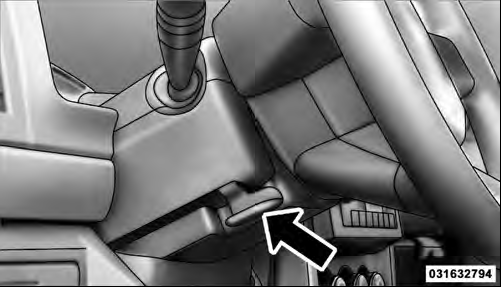
Tilt Steering Control Handle
To unlock the steering column, push the control handle downward. To tilt the steering column, move the steering wheel upward or downward as desired. To lock the steering column in position, pull the control handle upward until it is fully engaged.
WARNING!
Do not adjust the steering column while driving.
Adjusting the steering column while driving or driving with the steering column unlocked, could cause the driver to lose control of the vehicle. Be sure the steering column is locked before driving your vehicle.
Failure to follow this warning may result in serious injury or death.
See also:
Preparations For Jacking
1. Park the vehicle on a firm level surface as far from the
edge of the roadway as possible. Avoid icy or slippery
areas.
WARNING!
Do not attempt to change a tire on the side of the
vehicle c ...
Cooling System – Drain, Flush, And Refill
If the engine coolant (antifreeze) is dirty or contains a
considerable amount of sediment, clean and flush with a
reliable cooling system cleaner. Follow with a thorough
rinsing to remove all de ...
Seat Belts In Passenger Seating Positions
The seat belts in the passenger seating positions are equipped with Automatic
Locking Retractors (ALR) which are used to secure a child restraint system. For
additional information, refer to “In ...