


Cargo Tie-Down Hooks And Loops
The tie-downs located on cargo area floor should be used to secure loads safely when the vehicle is moving.
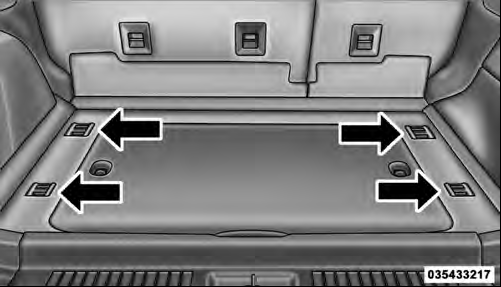
Cargo Tie-Down Hooks
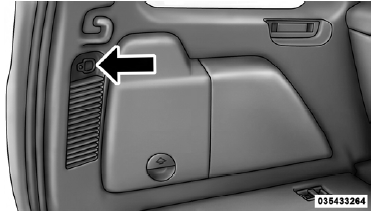
Cargo Tie-Down Loops
Cargo tie-down loops are located on the trim panels.
WARNING!
• Cargo tie-downs are not safe anchors for a child
seat tether strap. In a sudden stop or accident, a
tie-down could pull loose and allow the child seat
to come loose. A child could be badly injured. Use
only the anchors provided for child seat tethers.
• To help protect against personal injury, passengers should not be seated in the rear cargo area. The rear cargo space is intended for load carrying purposes only, not for passengers, who should sit in seats and use seat belts.
The weight and position of cargo and passengers can change the vehicle center of gravity and vehicle handling. To avoid loss of control resulting in personal injury, follow these guidelines for loading your vehicle:
• Do not carry loads that exceed the load limits described on the label attached to the left door or left door center pillar.
• Always place cargo evenly on the cargo floor. Put heavier objects as low and as far forward as possible.
• Place as much cargo as possible in front of the rear axle. Too much weight or improperly placed weight over or behind the rear axle can cause the vehicle to sway.
Do not pile luggage or cargo higher than the top of the seatback. This could impair visibility or become a dangerous projectile in a sudden stop or accident.
See also:
Lap/Shoulder Belt Untwisting Procedure
Use the following procedure to untwist a twisted lap/ shoulder belt.
1. Position the latch plate as close as possible to the anchor point.
2. At about 6 to 12 in (15 to 30 cm) above the latch plate, ...
Delete Uconnect™ Phone Paired Mobile Phones
• Press the button to begin.
• After the “Ready” prompt and the following beep, say “Setup Phone Pairing”.
• At the next prompt, say “Delete” and follow the prompts.
• You can ...
Language
When in this display you may select one of five languages
for all display nomenclature, including the trip
functions and the navigation system (if equipped). Press
the SELECT button while in thi ...