


Electronic Vehicle Information Center (EVIC) — If Equipped
The Electronic Vehicle Information Center (EVIC) features a driver-interactive display that is located in the instrument cluster.
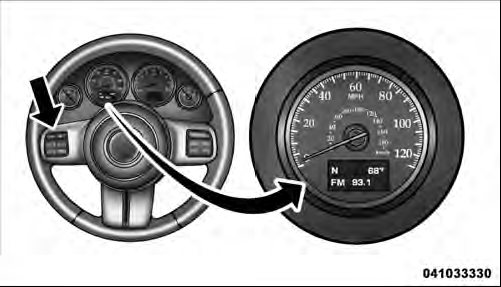
Electronic Vehicle Information Center (EVIC)
This system conveniently allows the driver to select a
variety of useful information by pressing the switches
mounted on the steering wheel. The EVIC consists of the
following:
• Compass Heading (N, S, E, W, NE, NW, SE, SW)
• Outside Temperature (°F or °C)
• Audio Information/ECO Display
• Fuel Economy
• Miles/kilometers To Empty
• Tire Pressure Status — if equipped
• Timer
• Display Units Selection
• System Warnings (Door Ajar, etc.)
• Personal Settings (Customer-Programmable Features)
The system allows the driver to select information by pressing the following buttons mounted on the steering wheel:
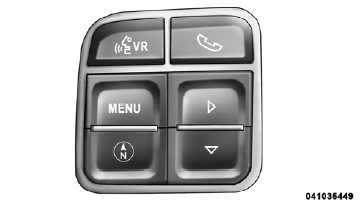
EVIC Steering Wheel Buttons
MENU Button

Press and release the MENU button to advance the display to each of the EVIC Main Menu features. Upon reaching the last item in the Main Menu the EVIC will advance to the first item in the Main Menu with the next MENU button press and release.
DOWN Button

Press and release the DOWN button when prompted by the EVIC to step through stored system warning message or Personal Settings features.
SELECT Button

Press and release the SELECT button when prompted by the EVIC to reset features with a reset capability or to change Personal Settings.
COMPASS Button

Press and release the COMPASS/ TEMPERATURE button to display one of eight compass readings and the outside temperature when the current screen is not the Compass/ Outside Temp screen.
See also:
Reception Quality
Satellite reception may be interrupted due to one of the following reasons:
• The vehicle is parked in an underground parking structure or under a physical
obstacle.
• Dense tree coverage may ...
General Information
This device complies with Part 15 of FCC rules and with
RS-210 of Industry Canada. Operation is subject to the
following conditions:
1. This device may not cause harmful interference.
2. This de ...
Radio Operation And Mobile Phones
Under certain conditions, the mobile phone being on in
your vehicle can cause erratic or noisy performance from
your radio. This condition may be lessened or eliminated
by relocating the mobile ...