


Play Video Games
Connect the video game console to the Auxiliary RCA input jacks located on the back of the center console.
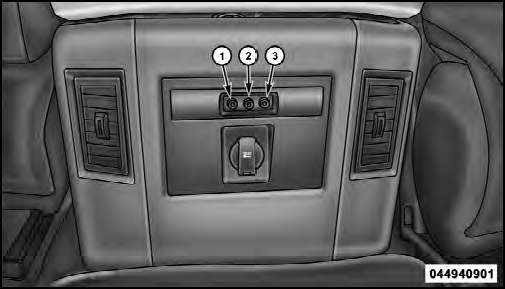
1. Video In – Yellow
2. Left Audio In – White
3. Right Audio In – Red
When connecting an external source to the AUX input, be sure to follow the standard color coding for the VES™ jacks:
NOTE: Certain high-end video games, such as Playstation3 and XBox360 will exceed the power limit of the vehicle’s Power Inverter. Refer to the Power Inverter section in your vehicle’s Owner’s Manual for more information.
Ensure the Remote Control and Headphone switch is on Channel 1.
See also:
Dialing Using The Mobile Phone Keypad
You can dial a phone number with your mobile phone
keypad and still use the Uconnect™ Phone (while dialing
via the mobile phone keypad, the user must exercise
caution and take precautionary sa ...
Head Restraints — Rear Seats
The head restraints on the outboard seats are not adjustable.
They automatically fold forward when the rear seat
is folded to a load floor position but do not return to their
normal position when ...
Side Window Demisters
A side window demister outlet is located at each end of
the instrument panel. These non-adjustable outlets direct
air toward the side windows when the system is in the
FLOOR, MIX, or DEFROST mod ...