


How To Use This Manual
Consult the Table of Contents to determine which section contains the information you desire.
Since the specification of your vehicle depends on the items of equipment ordered, certain descriptions and illustrations may differ from your vehicle’s equipment.
The detailed index at the back of this Owner’s Manual contains a complete listing of all subjects.
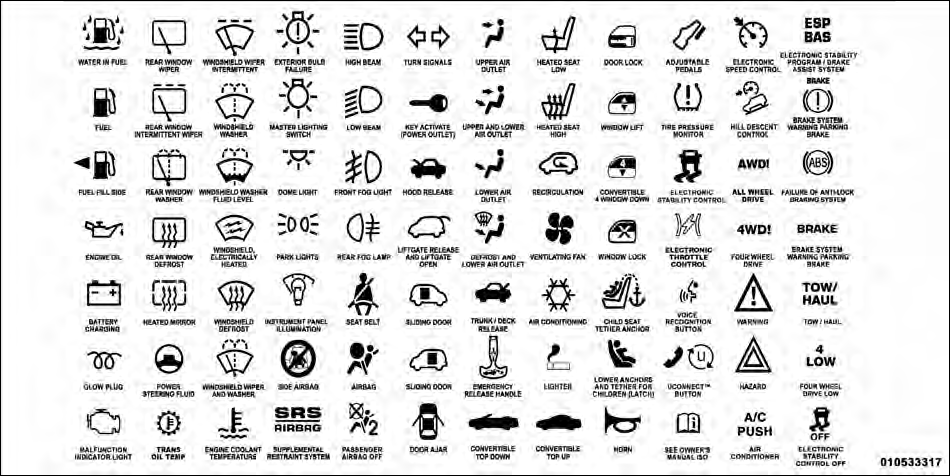
Consult the following table for a description of the symbols that may be used on your vehicle or throughout this Owner’s Manual:
See also:
Totally Integrated Power Module
The Totally Integrated Power Module is located in the
engine compartment near the battery. This center contains
cartridge fuses, mini-fuses and relays. A label that
identifies each component is ...
Garage Door Opener — If Equipped
HomeLink replaces up to three hand-held transmitters
that operate devices such as garage door openers, motorized
gates, lighting or home security systems. The
HomeLink unit is powered by your ve ...
Cooling System
WARNING!
• You or others can be badly burned by hot coolant
or steam from your radiator. If you see or hear
steam coming from under the hood, do not open
the hood until the radiator has had ...