


Child-Protection Door Lock System — Rear Doors
To provide a safer environment for small children riding in the rear seats, the rear doors are equipped with a Child-Protection Door Lock system.
To use the system, open each rear door, use a flat blade screwdriver (or ignition key) and rotate the dial counterclockwise to engage the Child-Protection lock and clockwise to disengage the Child-Protection locks. When the system on a door is engaged, that door can only be opened by using the outside door handle even if the inside door lock is in the unlocked position.
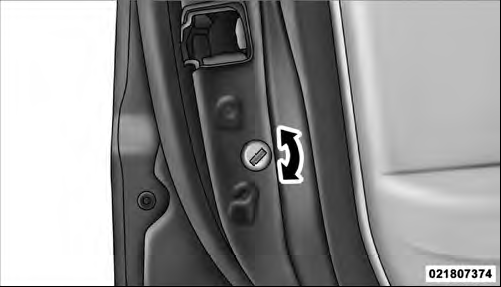
Child-Protection Door Lock
NOTE:
• When the child lock system is engaged, the door can
be opened only by using the outside door handle even
though the inside door lock is in the unlocked position.
• After disengaging the Child-Protection Door Lock system, always test the door from the inside to make certain it is in the desired position.
• After engaging the Child-Protection Door Lock system, always test the door from the inside to make certain it is in the desired position.
• For emergency exit with the system engaged, move the lock knob up (unlocked position), roll down the window, and open the door with the outside door handle.
WARNING!
Avoid trapping anyone in a vehicle in a collision.
Remember that the rear doors can only be opened from the outside when the Child-Protection locks are engaged.
See also:
Rear Cupholders
The rear cupholders are located on the back of the center console.
Rear Cupholders ...
Door Storage
Large storage areas are built into the door panels for easy
access.
Door Panel Storage ...
To Activate
Push the ON/OFF button. The Cruise Indicator Light in the instrument cluster
will illuminate. To turn the system off, push the ON/OFF button a second time. The
Cruise Indicator Light will turn off ...