


Automatic Headlights — If Equipped
This system automatically turns the headlights on or off according to the ambient light levels. To turn the system on, turn the end of the multifunction lever to the AUTO position (third detent). When the system is on, the Headlight Time Delay feature is also on. This means the headlights will stay on for 90 seconds after you turn the ignition switch to the LOCK position. To turn the Automatic System off, turn the end of the multifunction lever out of the AUTO position.
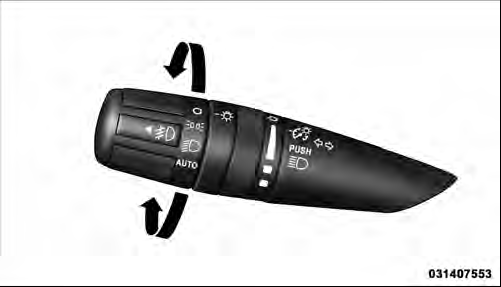
Headlight Switch
NOTE: The engine must be running before the headlights will turn on in the Automatic mode.
See also:
Premium Performance
Continuing to build on the Jeep brand's legendary off-road capability, the
all-new 2011 Grand Cherokee adds premium on-road performance to complete the
package.
The all-new 2011 Jeep Grand Chero ...
General Information
This device complies with Part 15 of the FCC rules and
RSS 210 of Industry Canada. Operation is subject to the
following conditions:
• Changes or modifications not expressly approved by
the p ...
Remote Start Abort Message On Electronic Vehicle Information Center (EVIC) —
If Equipped
The following messages will display in the EVIC if the
vehicle fails to remote start or exits remote start prematurely:
• Remote Start Aborted — Door Ajar
• Remote Start Aborted — Hood A ...