


Supported MP3/WMA File Formats
The radio will recognize only files with the *.MP3/WMA extension as MP3/WMA files. Non-MP3/WMA files named with the *.MP3/WMA extension may cause playback problems. The radio is designed to recognize the file as an invalid MP3/WMA and will not play the file.
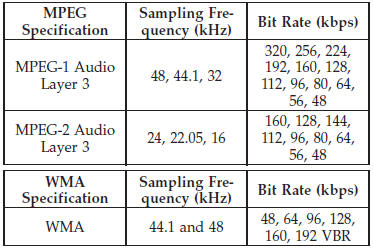
When using the MP3/WMA encoder to compress audio data to an MP3/WMA file, the bit rate and sampling frequencies in the following table are supported. In addition, variable bit rates (VBR) are also supported. The majority of MP3/WMAfiles use a 44.1 kHz sampling rate and a 192, 160, 128, 96 or VBR bit rates.
ID3 Tag information for artist, song title, and album title are supported for ID3 version 1 tags. ID3 version 2 is not supported by the radios.
Playlist files are not supported. MP3 Pro files are not supported.
See also:
Playback of MP3 Files
When a medium containing MP3 data is loaded, the
radio checks all files on the medium. If the medium
contains a lot of folders or files, the radio will take more
time to start playing the MP3 fi ...
Operating Instructions - Uconnect™ Multimedia (Satellite) Mode
NOTE: The ignition switch must be in the ON/RUN or
ACC position to operate the radio.
SEEK Buttons
Press and release the SEEK buttons to search for the next
channel in Satellite mode. Press the ...
Lower Anchors and Tether for CHildren (LATCH)
The rear seating positions have lower anchorages capable of accommodating LATCHcompatible
child seats having flexible, webbing-mounted lower attachments and child seats with
fixed lower attachme ...