


Supported MP3 File Formats
The radio will recognize only files with the *.MP3 extension as MP3 files. Non-MP3 files named with the *.MP3 extension may cause playback problems. The radio is designed to recognize the file as an invalid MP3 and will not play the file.
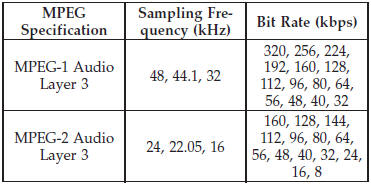
When using the MP3 encoder to compress audio data to an MP3 file, the bit rate and sampling frequencies in the following table are supported. In addition, variable bit rates (VBR) are also supported. The majority of MP3 files use a 44.1 kHz sampling rate and a 192, 160, 128, 96 or VBR bit rate.
ID3 Tag information for artist, song title, and album title are supported for version 1 ID3 tags. ID3 version 2 is not supported by the radios.
Playlist files are not supported. MP3 Pro files are not supported.
See also:
Classic Exterior Design
Every surface of the all-new Jeep Grand Cherokee is new and treated for
aerodynamics. This improves fuel efficiency and puts more fluidity into the
design while delivering a 7- percent improvement ...
Making A Second Call While Current Call Is In Progress
To make a second call while you are currently on a call,
press the button and say “Dial” or
“Call” followed
by the phone number or phonebook entry you wish to
call. The first call wil ...
Using This Feature
By using iPod cable or external USB device to connect to USB port:
• The audio device can be played on the vehicle’s sound system, providing metadata
(artist, track title, album, etc.) informat ...