


MUSIC TYPE Button
Pressing this button once will turn on the Music Type mode for five seconds. Pressing the MUSIC TYPE button or turning the TUNE/SCROLL control knob within five seconds will allow the program format type to be selected.
Many radio stations do not currently broadcast Music Type information.
Toggle the MUSIC TYPE button to select the following format types:
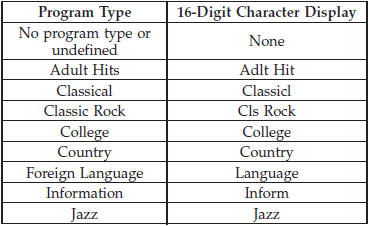
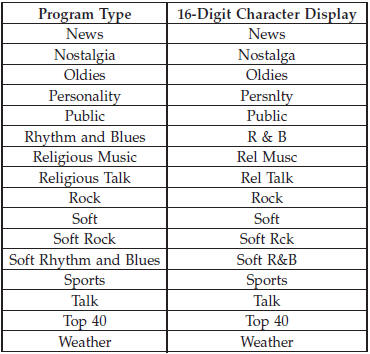
By pressing the SEEK button when the Music Type icon is displayed, the radio will be tuned to the next frequency station with the same selected Music Type name. The Music Type function only operates when in the FM mode.
If a preset button is activated while in the Music Type (Program Type) mode, the Music Type mode will be exited and the radio will tune to the preset station.
See also:
Tire Identification Number (TIN)
The TIN may be found on one or both sides of the tire,
however, the date code may only be on one side. Tires
with white sidewalls will have the full TIN, including the
date code, located on the ...
Changing the Volume
1. Start a dialogue by pressing the Voice Command
button.
2. Say a command (e.g., “Help”).
3. Use the ON/OFF VOLUME rotary knob to adjust the volume to a comfortable level
while the Voice Co ...
Reclining Rear Seat
To recline the seatback, lift the lever located on the
outboard side of the seat, lean back and release the lever
at the desired position. To return the seatback, lift the
lever, lean forward an ...