


Steering Wheel Audio Controls
The remote sound system controls are located on the rear surface of the steering wheel. Reach behind the wheel to access the switches.
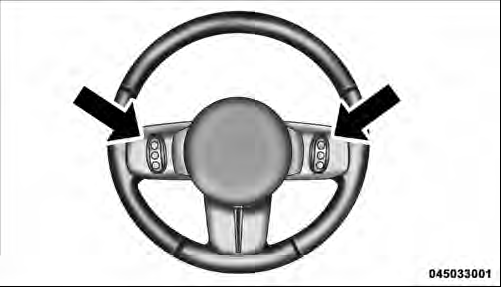
Remote Sound System Controls (Back View Of Steering Wheel)
The right-hand control is a rocker-type switch with a pushbutton in the center and controls the volume and mode of the sound system. Pressing the top of the rocker switch will increase the volume, and pressing the bottom of the rocker switch will decrease the volume.
Pressing the center button will make the radio switch between the various modes available (AM/FM/SAT/ CD/HDD/AUX/VES, etc.).
The left-hand control is a rocker-type switch with a pushbutton in the center. The function of the left-hand control is different depending on which mode you are in.
The following describes the left-hand control operation in each mode.
See also:
Treadwear
The Treadwear grade is a comparative rating, based on
the wear rate of the tire when tested under controlled
conditions on a specified government test course. For
example, a tire graded 150 woul ...
Liberty in the Market
The Liberty is the right answer to a rarely asked question. While the market
for street-friendly SUVs based on easy-riding, unibody designs is booming, the
one for lower-mileage, rougher-riding of ...
Before You Begin Programming HomeLink
Be sure that your vehicle is parked outside of the garage
before you begin programming.
For more efficient programming and accurate transmission
of the radio-frequency signal it is recommended th ...