


Driver Memory Seat — If Equipped
This feature allows the driver to store up to two different memory profiles, for easy recall through a memory switch. Each memory profile contains desired position settings for the driver seat and side mirrors and a set of desired radio station presets.
The memory switch is located on the instrument panel to the left of the steering column. The switch contains a S (SET) button to activate the memory save function. It also contains a rocker switch labeled with the number (1) and the number (2). The rocker switch allows the driver to recall either of the two pre-programmed memory profiles by pressing the appropriate side of the switch.
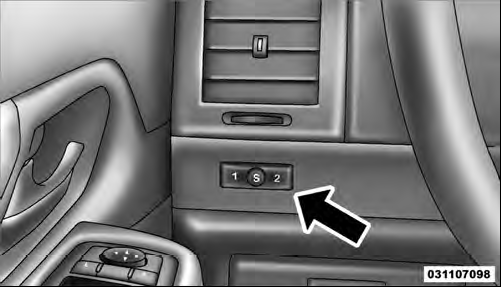
Driver Memory Switch
See also:
Pair (Link) Uconnect™ Phone To A Mobile Phone
To begin using your Uconnect™ Phone, you must pair
your compatible Bluetooth enabled mobile phone.
To complete the pairing process, you will need to reference
your mobile phone Owner’s Manual ...
Making A Second Call While Current Call Is In Progress
To make a second call while you are currently on a call,
press the button and say “Dial” or
“Call” followed
by the phone number or phonebook entry you wish to
call. The first call wil ...
Setting Memory Positions And Linking Remote Keyless Entry Transmitter To Memory
NOTE: Each time the S (SET) button and a numbered
button 1 or 2 are pressed, you erase the memory settings
for that button and store a new one.
1. Insert the ignition key, and turn the ignition s ...