


Front Storage Compartment
The front storage compartment (located on the left side of the instrument panel) can hold cell phones, PDAs, and other small items.
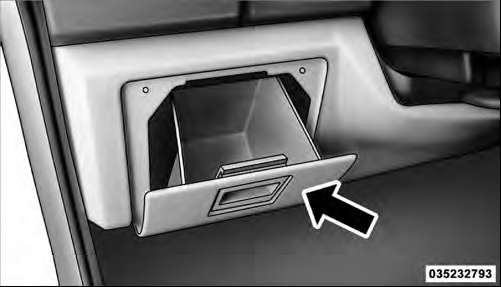 |Front Storage Compartment
See also:
Instrument Cluster Descriptions
1. Fuel Gauge
The fuel gauge shows level of fuel in tank when ignition
switch is in the ON/RUN position.
2. Fuel Door Reminder
This symbol indicates the side of the vehicle
where the fuel cap ...
Linking And Unlinking The Remote Keyless Entry Transmitter To Memory
Your Remote Keyless Entry (RKE) transmitters can be
programmed to recall one of two pre-programmed
memory profiles with a press of the UNLOCK button on
the RKE transmitter.
To program your RKE ...
System Status
Displays SYSTEM OK if there are no active Warning
Messages stored. Pressing and releasing the DOWN
button when SYSTEM OK is displayed will do nothing.
Displays SYSTEM WARNINGS PRESENT if there ar ...