


Electronic Speed Control
When engaged, the Electronic Speed Control takes over accelerator operations at speeds greater than 20 mph (32 km/h).
The Electronic Speed Control buttons are located on the right side of the steering wheel.
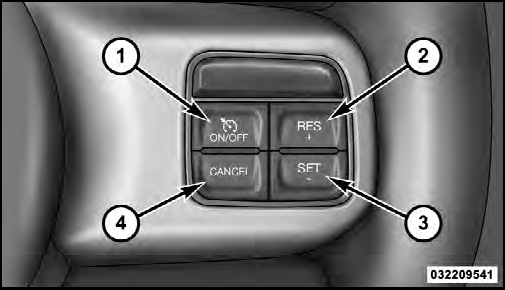
1 — ON/OFF
2 — RES +
3 — SET -
4 — CANCEL
NOTE: In order to ensure proper operation, the Electronic Speed Control System has been designed to shut down if multiple Speed Control functions are operated at the same time. If this occurs, the Electronic Speed Control System can be reactivated by pushing the Electronic Speed Control ON/OFF button and resetting the desired vehicle set speed.
See also:
Language Selection
To change the language that the Uconnect™ Phone is
using:
• Press the button to begin.
• After the “Ready” prompt and the following beep, say
the name of the language you wish to swit ...
Operating Instructions (Voice Command System) — If Equipped
Refer to “Voice Command” in the Uconnect™ User Manual located on the DVD for
further details. ...
Tire Inflation Pressures
The proper cold tire inflation pressure is listed on the
driver’s side “B” Pillar or rear edge of the driver’s side
door.
The pressure should be checked and adjusted, as well as
inspect ...