


How To Use This Manual
Consult the Table of Contents to determine which section contains the information you desire.
Since the specification of your vehicle depends on the items of equipment ordered, certain descriptions and illustrations may differ from your vehicle’s equipment.
The detailed index at the back of this Owner’s Manual contains a complete listing of all subjects.
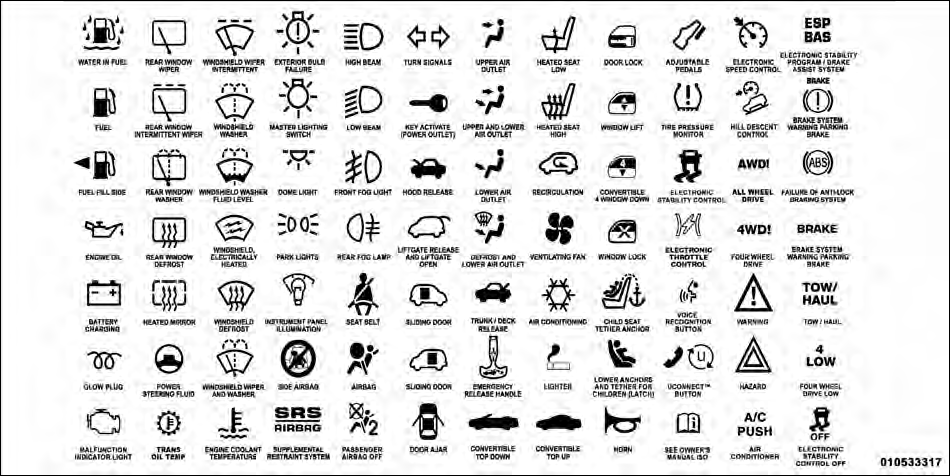
Consult the following table for a description of the symbols that may be used on your vehicle or throughout this Owner’s Manual:
See also:
To Engage Or Disengage The Child-Protection Door Lock System
1. Open the rear door.
2. Insert the tip of the ignition key into the lock and rotate to the LOCK or
UNLOCK position.
3. Repeat steps 1 and 2 for the opposite rear door. ...
Front Side Marker
1. Reach under the front fender flare and locate the front side marker socket.
2. Turn the socket assembly counterclockwise 1/3 turn and remove it from the
housing. Pull the bulb straight from the ...
Things You Should Know About Your Uconnect™ Phone
Uconnect™ Phone Tutorial
To hear a brief tutorial of the system features, press the
button and say “Uconnect™ Tutorial.” ...