


Automatic Operation
The Automatic Temperature Control system automatically maintains the climate in the cabin of the vehicle at the comfort levels desired by the driver and passenger.
Operation of the system is quite simple.
1. Turn the Mode Control knob (on the right) and the Blower Control knob (on the left) to AUTO.
NOTE: The AUTO position performs best for front seat occupants only.
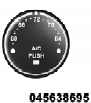
2. Dial in the temperature you would like the system to maintain by rotating the Temperature Control knob. Once the comfort level is selected, the system will maintain that level automatically using the heating system. Should the desired comfort level require air conditioning, the system will automatically make the adjustment.
You will experience the greatest efficiency by simply allowing the system to function automatically. Selecting the “O” (OFF) position on the blower control stops the system completely and closes the outside air intake.
The recommended setting for maximum comfort is 72°F (22°C) for the average person; however, this may vary.
NOTE:
• The temperature setting can be adjusted at anytime without affecting automatic
operation.
• Pressing the Air Conditioning Control button while in AUTO mode will cause the LED in the control button to flash three times and then turn off. This indicates that the system is in AUTO mode and requesting the air conditioning is not necessary.
• If your air conditioning performance seems lower than expected, check the front of the A/C condenser located in front of the radiator for an accumulation of dirt or insects. Clean with a gentle water spray from behind the radiator and through the condenser. Fabric front fascia protectors may reduce airflow to the condenser, reducing air conditioning performance.
See also:
Blind Spot Alert
There are three selections when operating Blind Spot
Alert. By pressing and releasing the SELECT button once,
the Blind Spot Alert feature can be activated in “Blind
Spot: Lights Only” mode. ...
Using The Remote Control
1. Press the MODE button on the Remote Control and
the Mode Select Screen will display, unless a video is
playing then only a small banner will appear on the
bottom of the screen.
2. While look ...
Upper Half Door Window Removal — If Equipped
Grasp the half door window and pull upward.
Upper Half Door Window ...