


Electronic Vehicle Information Center (EVIC)
The Electronic Vehicle Information Center (EVIC) features a driver-interactive display that is located in the instrument cluster.

Electronic Vehicle Information Center (EVIC) Display
The EVIC consists of the following:
• Fuel Economy
• ACC: (If Equipped)
• Vehicle Speed
• Trip Info
• Terrain: (If Equipped)
• Tire PSI: (If Equipped)
• Vehicle Info
• Messages
• UNITS: SETTING
• System Set-up
• Turn Menu Off
The system allows the driver to select information by pressing the following buttons mounted on the steering wheel:
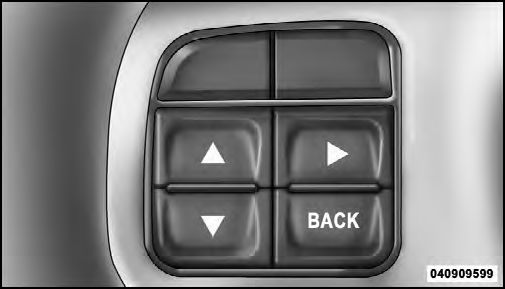
EVIC Steering Wheel Buttons
UP Button

Press and release the UP button to scroll upward through the main menus (Fuel Economy, Vehicle Info, Tire PSI, Cruise, Messages, Units, System Setup, Vehicle Speed, Trip Info, Turn Menu Off and sub-menus.
DOWN Button

Press and release the DOWN button to scroll downward through the main menus and submenus.
SELECT Button

Press and release the SELECT button for access to main menus, sub-menus or to select a personal setting in the setup menu. Press and hold the SELECT button for two seconds to reset features.
BACK Button

Press the BACK button to scroll back to a previous menu or sub-menu.
See also:
Reformulated Gasoline
Many areas of the country require the use of cleaner
burning gasoline referred to as “Reformulated Gasoline.”
Reformulated gasoline contains oxygenates and are specifically
blended to reduce ...
Starting Procedures
Before starting your vehicle, adjust your seat, adjust both inside and outside
mirrors, and fasten your seat belts.
WARNING!
• When leaving the vehicle, always remove the key fob from the igniti ...
Phone Call Features
The following features can be accessed through the Uconnect™ Phone if the feature(s)
are available on your mobile service plan. For example, if your mobile service plan
provides three-way callin ...