


Side Step Removal – If Equipped
NOTE: Prior to off-road usage, the side steps should be removed to prevent damage.
1. Remove the two nuts from the bodyside.
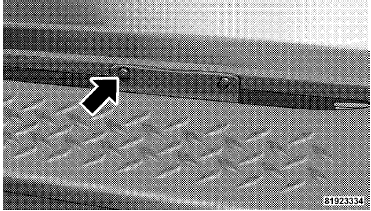
2. Remove one bolt from the underside of the vehicle.
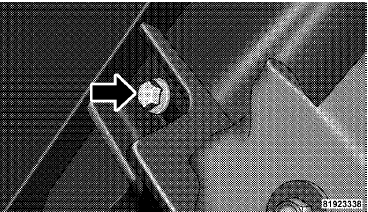
3. Remove the side step assembly
See also:
Replacement Parts
Use of genuine MOPAR parts for normal/scheduled
maintenance and repairs is highly recommended to ensure
the designed performance. Damage or failures
caused by the use of non-MOPAR parts for main ...
Supported Media (Disc Types)
The MP3 file recording media supported by the radio are CDDA, CD-R, CD-RW, MP3,
and CDDA+MP3. ...
Using The Touch-Screen Radio Controls
1. Press the MENU hard-key on the radio faceplate.
2. Touch the Rear VES soft-key to display the Rear VES
Controls. If a channel list is displayed, press the HIDE
LIST soft-key to display the Rea ...