


Electronic Vehicle Information Center (EVIC) — If Equipped
The Electronic Vehicle Information Center (EVIC) features a driver-interactive display that is located in the instrument cluster.
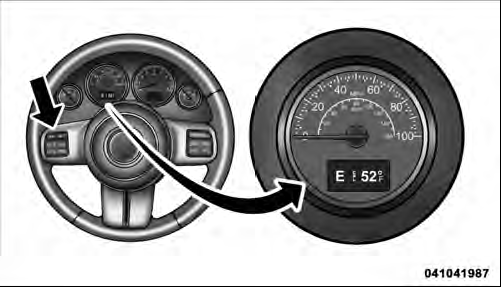
Electronic Vehicle Information Center (EVIC)
This system conveniently allows the driver to select a variety of useful information
by pressing the switches mounted on the steering wheel. The EVIC consists of the
following:
• Compass Heading (N, S, E, W, NE, NW, SE, SW)
• Outside Temperature (°F or °C)
• ECO Display
• Fuel Economy
• Miles/kilometers To Empty
• Timer
• Display Units Selection
• System Warnings (Door Ajar, etc.)
• Personal Settings (Customer-Programmable Features)
The system allows the driver to select information by pressing the following buttons mounted on the steering wheel:
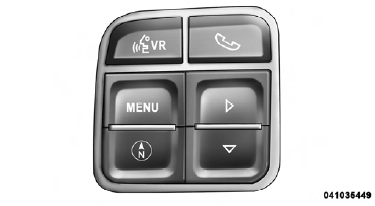
EVIC Steering Wheel Buttons
MENU Button

Press and release the MENU button to advance the display to each of the EVIC Main Menu features or to return to the Main Menu from a sub-menu. Upon reaching the last item in the Main Menu the EVIC will advance to the first item in the Main Menu with the next MENU button press and release.
COMPASS Button

Press and release the COMPASS button to return to the Compass/Outside Temperature/ Audio Information/ECO screen whenever the current display is not the Compass/Outside Temperature/Audio Information/ECO screen.
SELECT Button

Press and release the SELECT button when prompted by the EVIC to Reset Main Menu features with a reset capability or to change Personal Settings.
DOWN Button

Press and release the DOWN button when prompted by the EVIC to step through stored system warning messages or Personal Settings features.
See also:
Weight-Distributing Hitch
A weight-distributing hitch system works by applying leverage through spring
(load) bars. It is typically used for heavier loads, to distribute trailer tongue
weight to the tow vehicle’s front a ...
Power Steering Fluid Check
Checking the power steering fluid level at a defined service interval is not
required. The fluid should only be checked if a leak is suspected, abnormal noises
are apparent, and/or the system is n ...
Adding Washer Fluid
The windshield and rear window washers share the same
fluid reservoir. The fluid reservoir is located in the front
of the engine compartment. Be sure to check the fluid
level in the reservoir at ...